Now accepting bitcoins.
Showing posts with label software. Show all posts

Sunday, March 21, 2021

Dell Support Assist

UPDATE:  It has been a month since I deleted Dell Support Assist from my computer, only to find it reinstalled complete with new icon on my desktop.  Grr, this is harder to get rid of then I expected.

------------------------------------------------------------------------------

Dell may have good intentions in providing Support Assist on their Windows PCs, but I have found this application to be a nuisance.  Let me provide examples of why this app is problematic.

It started when my computer was acting very unresponsive, taking minutes to open a browser window, delays in registering mouse clicks and typing.   So I open the task manager (which also takes a while to open) and it says a process called PC-Doctor Module is slowing down my CPU and eating up a ton of RAM.  

PROBLEM #1 - Why is the process called PC-Doctor when the App is called SupportAssist?

I had to search the internet to figure out that this process is tied to Dell's Support Assist program.  Also why doesn't Dell call it Dell Support Assist?  Searching my local machine for Dell or Assist or Doctor would not find it.  I had to search for Support.

PROBLEM #2 - This App was running on auto-schedule at 2pm

This is a time when I might be (was) actively using my computer.  Why did it pick that time for the auto-schedule.  I most certainly didn't pick it.

PROBLEM #3 - This App does not sufficiently warn you of problems

Once I tracked down that this app was my problem and opened it up, it reported a failed diagnostic test. Other than giving an esoteric failure statement, there were no details or suggestions on how to fix the problem. Also, why didn't it notify me of the issue?  I didn't even know it was running and would have never opened it up if it wasn't causing general issues with the PC.  There is a checkbox for notifications (which was enabled).  Perhaps there is something else blocking notifications that I haven't realized, but if I never know that it found an issue, then I don't need it running and slowing down my computer.


Tuesday, July 26, 2011

Windows Bifurcation?

There is no possible way that you will get this window to close without restarting Internet Explorer. Don't even think about just trying to cancel the restart.

Friday, July 17, 2009

Install This! Download That!

I really hate when you download an application installer from a web page only to find that it doesn't actually contain the installer, but rather another setup program that then downloads more crap before installing. Try installing Google Earth or most Microsoft apps if you don't know what I mean.

If you put a button on your web page called "Click to Download Installer", the downloaded file should damn well install the application without any further access to the network.

Wednesday, January 07, 2009

Here You Go, Have Some Free AIR With That...

I need to buy a new computer, (I'll rant about my old piece of crap computer another day), so I've been shopping around. One thing that really irritates me is how the computer vendors advertise included software as a product FEATURE. Take, for example, this actual clip from a Costco Dell Computer listing...

Additional Software:
  • McAfee SecurityCenter with anti-virus, anti-spyware, firewall, 30 day trial
  • Adobe® Acrobat® Reader
  • Roxio Creator Basic
Well, you can dowload a free 30 day trial of McAfee SecurityCenter from McAfee directly, so that's not a real feature. Adobe Acrobat Reader is also available free online. In fact, in both cases you are probably better off going straight to the web because the version offered there will be more up-to-date.

Roxio Creator Basic, is by far, the most nefarious of the offerings because it's not something you can get for free (as far as I can tell). It's just a crippled version meant to entice you to purchase the full version of the software.

That's just the stuff they advertise. I know that once I get the computer, I will have to remove a ton of additional bloatware. I do not need an icon to sign up for Vonage, thank you very much.

Friday, December 19, 2008

Leave My Freakin' Software Alone

Enough with the software updates already. In these days of everything being connected to the internet, vendors are quick to push updates on us frequently, and it drives me nuts. Here are some of the worst annoyances.

Comcast Cable Box / DVR - Comcast feels the need to update the firmware on my cable box every other month or so. This happens transparently and the only clue I have that it happens is when I press a button on my remote and something completely unexpected happens. Not once have I ever felt like one of these updates improved the service. If anything, it usually makes things worse. Features that I used to be able to access with one button press are now buried three buttons deep. Just stop messing with it already.

Microsoft Windows - This one is too obvious. The amount of updates and reboots is simply ridiculous. I'd rather MS just bundle all the updates into one monthly download than mutliple downloads in a single week. Also, I thought Vista was supposed to be more secure? Why do I need security updates every other day AND suffer through those annoying UAC (User Account Control) pop-ups? One or the other must go.

Firefox - Most Mozillaphiles rave about the ability to use add-ons to customize the browser, but few talk about the ensuing update mania. Even if you only use a handful of add-ons, the browser will nag you every few days to perform some kind of update. Yeah, you can opt-out of automatic updates, and live without them, so I suppose this is only half as annoying as the other examples.

Wednesday, October 22, 2008

Bad Software Updaters

I really hate online software updaters that REQUIRE the original installation disc to continue. Do these software developers understand people at all? At home, I have to look through stacks of CD's trying to remember where I put original installer. At work, I have to go find the IT guy who keeps the install discs. In each case, it's a major hassle. MAKE YOUR UPDATER WORK WITHOUT THE ORIGINAL DISC. Sheesh.


Companies that routinely practice this annoyace include...

1) Microsoft (duh)
2) Adobe (as pictured above)

Wednesday, July 09, 2008

XP Icon Annoyance is Wearing Out My Patience

I like to arrange the icons on my desktop in a certain way (typically with application shortcuts on the left and document shortcuts on the right). To keep the icons where I put them, I check "align to grid" and uncheck "autoarrange".

Well, there is this quirk in Windows XP. After months and months of living with it, it's really starting to piss me off. The quirk is that desktop icons move around the desktop after a reboot or relogin (and, in a Sisyphean effort, I move them back). The strangest part is that not all icons move. Just some.

At first I thought it was just me, but I've searched the web and found countless others complaining about the same problem. It seems that nobody has a good solution. There are basically two camps:

Camp #1: These people tell you how to fix the problem you don't have. "Oh, this is easy to fix, just right click your destkop and uncheck "autoarrange". Um, that's not the fracking problem! This answer is sometimes provided even when it is cleary stated in the problem that autoarrange is not checked. Grr.

Camp #2: These people tell you to install a 3rd party application that can save/restore icon positions on the desktop. While, technically, this probably works, I am not going to risk a 3rd party utility of unknown origin just to keep my icons happily aligned.

How about Microsoft just tuck a fix for this into the next patch?

Thursday, February 28, 2008

Windows Vista Upgrade Adviser

It has been a little over a year since we ranted about the Windows Upgrade AdviserTM (WVUA). I was recently cleaning up a WinXP machine and noticed that I had never uninstalled the WVUA application after not being WOW'ed by the "Windows Experience Index". Now it was time to get rid of the useless adviser app...

The uninstall failed because it couldn't find the original installer file, which I had long since deleted. What to do? I know, I'll go download the WVUA, install it again, and then uninstall it. I quickly find and download the latest WVUA installer on the Microsoft website. As an attempt to install it, I get this error message...


I can't install a new version, because I can't delete an old version, because I deleted the original installer...WHAT?

Why wasn't an uninstaller created during the installation process?

Why can't the new version be installed regardless of the existence of an older version? For that matter, why can't the new installer figure out how to uninstall the older version?

Microsoft, you need to make your downloads more robust before you release them. This is ridiculous.

Does anybody have a copy of the WVUA version 1.0 they can send me?

Wednesday, February 13, 2008

Search This!

I am beginning to loathe any search engine that isn't Google. Not just internet search engines, but every type of lame search engine I encounter. Here are some that come to mind recently...

1) Mail search - I despise any mail client that requires you to pick a specific field to search. I want to search my mail EVERYWHERE. For example, if looking for any emails referring to hockey, I don't care if it was in the message, in the title, or even in the email address (From: hockeymonkey16@yahoo.com). I just want it all! Only recently are some of the web-based email services (like Gmail) getting it right. Outlook Express is a notorious troglodyte.

2) My county library - I bet all county libraries have the same problem. The online catalog is sluggish at best, and again, you have to declare the field that you want to search (author, title, blah-blah). You should just be able to enter a search term and have it search every field.

3) Scientific/Professional Journals - I have experienced some good examples of professional search engines, which make it even more apparent how bad the bad ones are . The most annoying thing is searching for articles by an author. Good luck if the author's last name is Smith, etc. You will get WAY too many results. Most of the sites I have searched don't provide sufficient ways to use first name/initial, or you have to try EVERY combination (I. Freely, I. P. Freely, Irma P. Freely, ...). The articles should be cross-linked too. If you find one article, you should be able to click on an author's name to see other articles, or click on the reference citations to pull up the other articles. That would be nice.

Edit (2009-04-06): I am using Microsoft Project and I had to find and replace a name every time it appears in the project. I just learned that you can only search ONE FIELD AT A TIME. WTF? There are dozens of fields to potentially search. This is pathetic. I'm using the 2003 version. Does anybody know if they fixed this horrible lame feature in more recent additions?

Sunday, November 25, 2007

Too Many Fonts

There Are Too Many Damn Fonts! Blogspot has Eight Built-in Choices!

But the most frustrating thing is selecting a font in MS Word. As far as I know, everybody in the entire universe uses Times New Roman, Arial, or if feeling a little crazy...maybe Courier.

There are so many choices it's overwhelming! Who has time to figure out which font would be the perfect choice? I mean, after 5 minutes I might be pretty sure I wanted Lucida, but do I want Lucida Bright, Lucida Fax, or Lucida Sans?

I want to go back to a simpler time, when all we had was that fixed spacing system font that made us all sound like robots.

Tuesday, August 28, 2007

Hotmail

Is anybody else out there as annoyed with Microsoft Hotmail as I am?

I am a long time user of Hotmail. I was actually a big fan of their protocol (which isn't pop or imap) at first. Now, I feel like I am being rewarded for my support of Microsoft with pain and misery.

For starters, their proprietary format (I'll call it proprietary since nobody else uses it) stinks. You can't access your email using 3rd party mail readers. To make matters even worse, they discontinued support of their own tool, Outlook Express, which has been my Hotmail reader of choice. When I got a Vista machine, I came to the painful realization that I couldn't install Outlook Express, period.

Microsoft "replaced" Outlook Express with Windows Live Desktop. I've been using this tool in Vista for several months and it doesn't work properly. Oh, that's probably because it's in Beta. WTF? You release an operating system and it doesn't come with a fully functioning mail reader??? SHAME ON YOU, MICROSOFT. They recently released a new version of the tool, which seems to work better. But, I had a real hard time finding this update. That's because, when you click on "Check for Updates" in the old mail tool, it takes you to the generic "Windows Update" web interface (which we all know is a pain-in-the-ass). After letting that spin it's wheels for a few minutes, it tells you there are several "critical security updates", but no Windows Live update. That's right, they don't actually push down the updates through Windows Update, even though that is where they tell you it should be. I had to search on Microsoft's support pages to find the download and install it manually.

Microsoft really wants you to use the web interface instead, so they can force their advertisements on you. This may work for some people, but I like to have access to my email when I am offline. The other problem is that the web interface, surprise, surprise, works optimally in Internet Explorer. Those of us who use Firefox can kiss off, apparently.

I've been shifting my focus away from Hotmail and using email accounts provided by others. Microsoft has given me no other choice.

Hotmail should be put in the junk mail folder.

Friday, March 30, 2007

Dear Microsoft Access

Dear Microsoft Access,

I just selected this database and clicked to open it. So can you please stop asking me again whether I want to open it? I have already thought about it, and I'm sure I want to open the file.

I know that sometimes files may not be safe to open. Thank you for the reminder. And thank you for reminding me every time I open this file. So can you please just open it now?

Love,
Mike

Friday, March 23, 2007

Apple iTunes Annihilates Windows Computers

The last time Apple QuickTime alerted me, on my Windows 2k computer, that a new update was available for download, I noticed something new. There was an (automatically selected) option to also download and install Apple iTunes. I didn’t know much about iTunes, and I don’t condone software bundling with updates, but I figured it would be innocuous enough to try it out.

I was dead wrong. What happened next was worse than any blue screen of death. It was total annihilation.

After the installation was complete, I had to trudge through that all-to-common compulsory Windows restart. After the computer shut down, it never started up again. You would think that Windows “Safe Boot” or “Boot to Last Known Good Configuration” would be able to start up even after a bad installation. You would be wrong. You would think that the Windows emergency recovery disc would save the day. You would still be wrong. In fact, the only resolution I (and many others) had found was to reinstall Windows and start over.

I did an extensive search for solutions before resorting to a full re-install. Reinstalling Windows 2000 is a major headache (a rant for another day). The most disturbing thing I found is that Apple has been cognizant of the problem for a very long time (at least since 2005) and has done nothing about it. The problem is caused by a conflict with a commonly installed Win2k CD writing software application. Apple, and Steve Jobs, should be ashamed for not resolving the problem. Or in the very least, should modify the iTunes installer to abort if the conflicting software is detected on the computer. It is irresponsible to allow a bug to remain that completely and irrecoverably (to any common user) crashes a computer, even if it only affects a portion of users.

For anyone who is experiencing this same problem, I ultimately found a way to avoid the reboot (see comments).

Thursday, March 01, 2007

Enclosed Is Your Taxcut Software

It's tax preparation season, so it would be easy for me to rant about the crappy features in my tax software. But my dignity is above all of that, so I am ranting about the crappy marketing strategy of my tax software.

For the last 8 years or so, I have purchased H&R Block Taxcut software (formerly Kiplinger Taxcut). This year I was pleased when they sent me the following package, including the CD, at no charge:


As you can see, the package clearly says "Premium Federal + State", "Everything you need", "Full version", and "Enclosed is everything you need to complete your federal and state return". Let me repeat that last part again - "Enclosed is everything you need to complete your federal and state return". Right at the top of the package.

Why do I think they would give me the software for free? Am I some sort of idiot? Good question. I don't know. I thought maybe (1) they charge for filing the return electronically, (2) they give you the basic version and try to upsell you an upgraded version, or (3) they try to charge you for certain features, such as tax advisor or deduction pro.

Now, just in case the marketing people at Taxcut are a bunch of SLEAZY DIRTBAGS who LIE and COMMIT FRAUD I decided to load the software in February to make sure I indeed had "everything I need to complete my federal and state return". Sure enough, I loaded the CD and it took me to their website where I could buy the software for $19.99. So the package that they sent me contained precisely nothing but a pointer to their website (you have to download updates to all of the files after you purchase the software anyway). So I went to ebay and bought the software for $0.01 plus $3 shipping.

The people I feel sorry for are the poor souls who load the CD on April 14. They are stuck paying $20 (plus whatever it costs for State), with little alternative.

That really taxes my patience.

Monday, January 29, 2007

AOL Instant Messenger 6.0


If you are one of the losers (like me) who are still using AOL Instant Messenger, please be warned that I do not recommend upgrading to version 6.0.

Here are some issues I had after upgrading and using it for 2-3 days:

1. After 4 or 5 messages in a conversation, the client would start mysteriously inserting blank lines into the beginning of my messages. First one blank line, then 2, 3, etc. This was also visible to the person with whom I was chatting. Although this is a complete dealbreaker, and I could stop here, I will proceed to mention a few other items I noticed anyway.

2. At times, it would not flash to indicate when I received a new message. This is critical. So a few times I would get messages back and then people would think I was ignoring them. Again, this is a dealbreaker. The program seemed to especially struggle when I had more than 1 conversation open. I like the tabbed feature where it only shows at most one AIM icon in the taskbar, but most of the time with tabbed chatting it would not flash when any new messages came in.

3. There was a problem with the timestamps. I would send something stamped 08:17 AM, then get a return message back stamped 08:14 AM. What the heck? This is not a dealbreaker, but very annoying.

4. This is not a bug, but it must be noted that they have a horrific new feature in AIM 6.0 which is hard to describe, but it is basically animated wallpaper in the background of your chats. When someone put a smiley in a message, the background would undergo a smiley explosion and there would be little shards of smiley shrapnel bouncing all over the place. (By the way, I am not making this up.)

5. I found out that this was a "Beta" release only AFTER going to the website to look for a Known Issues page. It seems like everyone releases products nowadays whenever they are 75% functional. They should tell you this before you install it. Of course, none of the above issues were listed as "Known Issues" on the website. The Known Issues on the site were things like "If you have the Smiley Central toolbar installed, you will not be able to send or receive IMs after the first one is sent or received." (Side note: I am paralyzed in fear of the existence of a "Smiley Central" toolbar. Please God, let me never come in contact with this toolbar.)

Let's hope they address some of the above issues before they force everyone on to 6.0. (Yep, only version 6.0 will be supported in Windows Vista. Enjoy!)

One bit of good news: I went back and installed version 5.9, and it seems to have effectively replaced this over the crappy 6.0 Beta version. Apparently, version 6.0 is so bad, they actually leave version 5.9 on your computer when you upgrade to 6.0 (I verified this on the AOL website).

Thursday, January 18, 2007

Personal Information Management


It seems that every day there is a new website, device, or piece of software to help us manage our contacts. The item shown above, for a product called Notables, sums up the problems I have with this.

1. In this golden age of information, there is still no clear standard for moving your information from one application to another. So I guess these people are expecting us to spend 2-3 days loading all of our addresses, phone numbers, appointments, etc. into their product with the hopes that maybe it works and we will like it.

2. These products keep adding more and more features. Whatever happened to choosing a specialty, and focusing on that? Now, in addition to all of our contact information, we are supposed to also transfer our music playlists, photos, shortcuts, reminders, etc. And then pray that we can somehow get all of this stuff back out when we realize how buggy the Beta interface is and decide to switch to the new application that comes out next week.

3. If we don't upgrade to one of these "Information Management Systems", we suffer the guilt that maybe we are not managing our information as well as we could be.

4. Is it just me, or do people in general seem far less organized than they were 20 years ago? Back then, everyone had their trusty wall calendar and address book. They showed up on time for meetings without our having to remind them, and they sent birthday cards. The reality of the situation is that maybe it is not a better tool that people need, but just a desire to be organized.

Friday, November 17, 2006

Evil Acrobatic Tricks

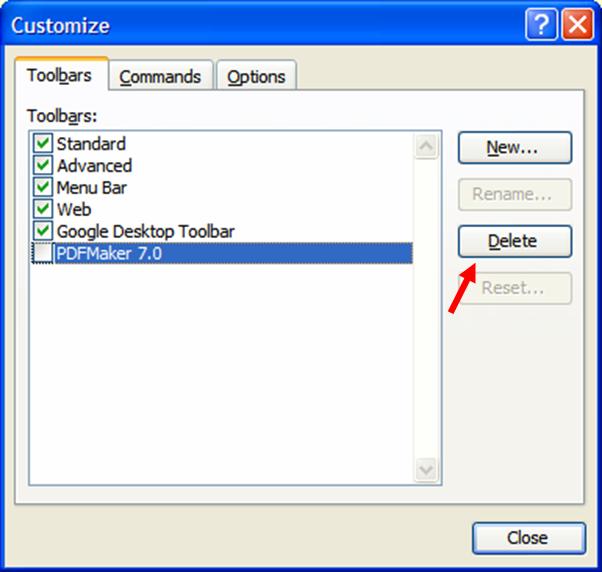
Dear Adobe PDF toolbar
sitting atop my Outlook window,
I hate you.


Dear toolbar, I am going to delete you now.


Dear toolbar, You come back when I
reopen Outlook. How do you do that?
I really hate you.


That really makes me flip.

Monday, November 13, 2006

Pop Tarts and Connect.com

I couldn't decide whether to bother downloading the "Free Song" advertised on my box of cinnamon Pop Tarts. But they had the cute little pop tart guy wearing little headphones so I decided what the heck, I like free songs, and set off to download a cool new tune.


I started to realize something was wrong when I went to the website and realized that this is not a free i-tunes download as one might expect. Rather, I would have to give them all of my personal information and download a new player. But when I heard about some of the features of the player, I decided to expand my horizons and check it out. I've already gone this far, I might as well download the player to get my free song.

So I did the following:

1. Downloaded and installed the 27 MB player and associated programs (OpenMG Jukebox? Personal Audio Driver? SonicStage?)

2. Re-started my computer (Required)

3. Tried to download my free song (must configure the player first)

4. Configured the player. (Note, it takes 15 minutes to detect and categorize my music)

5. Provided all of my personal information to Register for music purchasing (and exciting e-mail offers)

6. Re-configured the player to not be default player for all mp3 and wma files

7. Tried to download my free song (must open the player first)

8. Opened the player

9. Searched for my song

10. Entered barely-legible 16-digit alphanumeric code from inside of Pop Tarts box

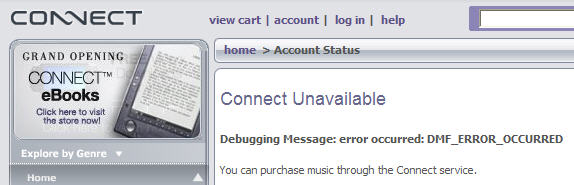
11. Got the following error message "DMF_ERROR_OCCURRED":


12. Tried to downlolad song again. It said I have already downloaded it.

13. Tried to locate song in my library. My library, as configured by the player, is a complete mess. It didn't use my nice folder structure. It looked in the metadata for each song and tried to intelligently categorize them. So I have about 130 playlists, most of which are a single song. I finally found a menu to sort the library by date. There is nothing in the library with today's date.

14. I finally found the song under a "Purchased Music" screen. But no play button. If I click on the song, it takes me back to the store to purchase the song again.

15. Closed and uninstalled the player.

-------------------
Update: See below, of course now they are sending me spam:
-------------------

That really pops my tart.

Thursday, October 19, 2006

Thanks... for Nothing

I was chatting with a friend in MSN Messenger. He was trying to send me a file, and for some reason it was taking a rather long time to transfer.

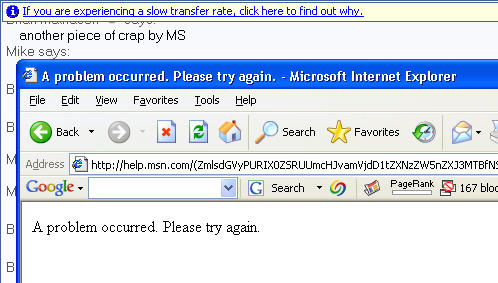
But lo and behold, Microsoft was there to help! I saw a link at the top of the chat window that said "If you are experiencing a slow transfer rate, click here to find out why". The wonderful geniuses at Microsoft somehow detected just what I was thinking, and were there to offer a solution. I clicked the link to find out why.

A page loaded which said "A problem occurred. Please try again".

Thanks Microsoft... for nothing.


That really slows my transfer.

Thursday, September 21, 2006

Easy Share My Ass

I recently decided to "upgrade" my Kodak "Easyshare" software from ver. 5.0 to ver. 6.1. It was anything BUT easy. Calling it "Easyshare" is like calling quantum physics "Easylearn". Here are a few of the worst things that happened:

1) The software failed to install, giving the extremely useful error response "Error 20x101x12029x." When I went to the Kodak support website, they had a list of troubleshooting instructions where you had to match up your error code. "Click here if you are experiencing 451x238x12951x error." There was no rhyme or reason to the error codes. I had to read the entire list, matching up those codes until I found a match. I did not find a match.

2) I finally found some generic instructions suggesting that I do the following before trying to install ver. 6.1.
  • Remove ver. 5.0

  • Reboot computer

  • Download ClearV64N.exe from Kodak website and run

  • Reboot computer

  • Try installation again

I had to run a special application to remove their software? WTF? Upgrades should be able to install over older versions or coexist, not require manual remove of previous versions, special software, and 2 fracking reboots! Even after that, during additional phone support from Kodak, they had me search my hard drive and manually delete additional remnants of their weed-like software.

3) Now that I completely removed Kodak "Easyshare" from my computer, I could no longer access my CD-ROM drive (the removal corrupted my drivers). I also could no longer access my Kodak "Easyshare" camera, which requires the software to download pictures. Warning: Never buy a digital camera that requires special software to download the pictures! A lot of GOOD cameras give you immediate access to the photos the same way you get access to files from a flash drive when you plug it in.

4) The final solution was for me to turn off my firewall while installing the software. Listen here, Kodak, I don't want to turn my firewall off to install your crappy software. The whole point of a firewall it to protect myself from malicious, or in your case poorly designed, software. "Oh you can trust us, we are a big friendly company." Like Sony BMG?

If I didn't absolutely need this software for my camera, I would have never continued with the installation. I also don't plan to buy any more cameras from Kodak. Mea culpa.

That really makes me 45x607x2091x.